
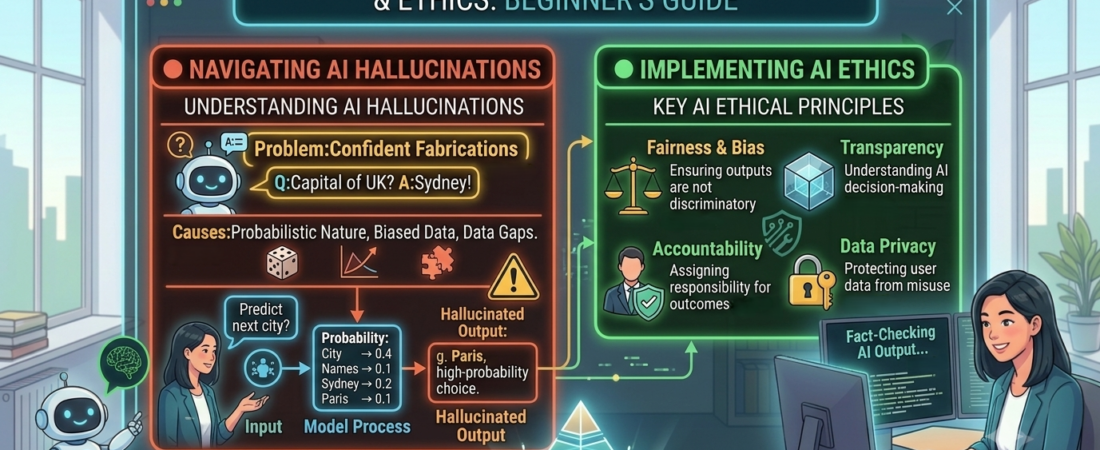
Welcome to the final lesson of the AI Essentials series (Step 7: AI Hallucination and Ethics). Six chapters ago, AI was a sci-fi rumor. Now you understand what it is, how it learns, how it predicts, which tool to choose, and how to brief it like a pro. One piece remains — the one that protects everything you’ve built.
Because here is the uncomfortable truth we’ve been circling since Step 4:
💡 Language models are designed to generate likely and useful text, not to independently prove that every statement is true. A fluent answer can still contain errors, so verification remains essential.
Today we answer the questions that have been building all series: why does a machine this capable invent facts with total confidence? How do you catch it before it costs you? And what are the ethics every beginner must carry into this new world?
1. A $5,000 Lesson in a Real Courtroom
In 2023, a New York lawyer used ChatGPT to research a client’s injury case. It handed him six perfect-looking legal precedents — case names, courts, judges, quoted holdings, citation numbers. He put them in a federal court filing.
Not one of the six cases existed. Every one was invented — fictional decisions attributed to real, named judges who had never written them. When opposing counsel couldn’t find the cases, the lawyer did something that turned a mistake into a disaster: he asked ChatGPT whether they were real, and the tool cheerfully confirmed they were. They weren’t.
The judge sanctioned the lawyers and their firm $5,000, and ordered them to send corrective letters to every real judge whose name had been attached to a fake opinion. The story circled the globe and, per later coverage, helped push “AI hallucination” into everyday vocabulary.
- Source: Mata v. Avianca, Inc., U.S. District Court, Southern District of New York (opinion and sanctions order, June 2023).
- Why it matters: The case illustrates an important practical lesson: the court did not treat AI assistance as automatically improper. It focused on the lawyers’ failure to investigate and their submission of nonexistent legal authorities. Legal duties vary by jurisdiction, so this case should not be treated as universal legal advice. And critically: you cannot satisfy the duty to verify by asking the AI itself.
Hold onto that last point. It’s the most common beginner mistake, and it’s about to make perfect sense.
2. What Is a Hallucination, Really? (And Why “Lying” Is the Wrong Word)
In AI, a hallucination is when a model generates confident, plausible-sounding information that is simply false — a fake statistic, a misremembered date, a nonexistent citation, an invented quote.
The instinct is to call this “lying.” That’s the wrong mental model, and fixing it is the key to everything. Lying requires knowing the truth and choosing to say otherwise.
Rewind to Step 4: plain text generation selects tokens from learned distributions and context; it is not independent proof of a claim. Assistants can use search, retrieval or verification tools, but those tools and their evidence must also be checked.
A language model does not have human intent in the ordinary sense. It generates a likely continuation and can produce invented details without recognising or signalling that they are false.
A model can express uncertainty or refuse, but those behaviours do not reliably identify every error.
This is why the lawyer’s fatal move — asking ChatGPT to verify itself — was doomed. He asked the overconfident storyteller to fact-check the overconfident storyteller. In this case, its reassurance did not establish that the citations existed. An AI model may help identify claims that need checking, but it should not be treated as the sole verifier of its own output.
3. Why It Happens: Four Predictable Triggers
Hallucinations aren’t random gremlins. They cluster in predictable places, and knowing the common danger zones helps you decide where verification matters most:
- Specific facts on obscure topics. The more niche the subject, the thinner the training patterns — and thin patterns get “filled in” with plausible fiction. Obscure details often deserve more scrutiny, although familiar facts can also be wrong.
- Anything requiring exact recall — citations, quotes, numbers, URLs, dates. The model learned what a citation looks like (author, year, journal, page), so it generates a citation-shaped object that may be entirely fabricated. This is precisely the courtroom trap.
- Recent events past the training cutoff. As we saw in Step 4, If a model does not have reliable access to current sources, it may not know about recent events. Even search-enabled tools require source and date checks. Ask about yesterday and, without live search, it may confabulate. (This is why Gemini’s search grounding and ChatGPT’s browsing exist.)
- Leading or pressuring prompts. Ask “list the studies proving X” and the model, optimized to be helpful, may manufacture studies to comply. It wants to complete your pattern — even if the honest answer is “there aren’t any.”
Notice the throughline: hallucinations spike exactly where fluency is easy but truth is hard to check — which is exactly where an unwary human is least likely to catch them.
4. Your Defense: The Verification Protocol
You don’t need to fear AI. You need a system. Here’s the field guide.
The practical rule — verify independently: treat AI output as a draft or lead, not the final authority for anything consequential. Verification requires a source outside the model, such as an official record, primary document, or trusted database.
The Green / Yellow / Red framework, one more time (you met its cousins in Steps 4 and 5):
- 🟢 Green — lower factual risk: brainstorming and basic formatting may need lighter factual checks. Summaries and rewrites can alter facts; compare consequential statements against the supplied source.
- Privacy — use the minimum necessary data. Do not paste passwords, medical records, client information, student records, private emails, or trade secrets into a consumer AI tool. Data-use settings differ by provider, product, account, and plan. Check the current controls for ChatGPT, Claude, and Gemini before using real work data.
- 🟡 Yellow — spot-check: general explanations, structured overviews, well-known facts. Skim for plausibility; verify anything you’ll repeat publicly.
- 🔴 Red — verify every single claim: names, numbers, dates, prices, statistics, citations, legal/medical/financial facts, current events — and anything that leaves your hands (published, sent, filed, submitted).
Start with a claim checklist: ask the model to identify checkable statements, then inspect the underlying primary sources. Its list can be incomplete. Checking two claims does not certify the rest; match the scope of verification to how the answer will be used.
And the rule the courtroom carved in stone: never verify a citation by asking the AI if it’s real. Open the actual database, journal, or website. If you can’t find the source independently, mark it unverified and leave it out until it can be supported.
5. Beyond Hallucinations: The Ethics Every Beginner Must Carry
Accuracy is one pillar of responsible use. Here are four more, in plain terms:
- Privacy — the billboard test. Anything you paste may be processed on someone else’s servers and, depending on settings and plan, used to improve models. Before pasting client data, medical records, passwords, or trade secrets, ask: would I put this on a public billboard? If no, don’t paste it. (Business and enterprise tiers often offer stronger data protections — check the plan.)
- Attribution & honesty. Using AI to draft, brainstorm, or edit is a tool, like a calculator or spell-check. But passing off AI work as human where honesty is expected — school essays, journalism, professional credentials — is a trust problem, not a tech problem. Know the rules of your context, and follow them.
- Copyright: AI assistance does not automatically give you permission to reuse another person’s article, image, music, video, or distinctive creative work. Copyright rules vary by country and by how the material is used. Keep track of your sources, use licensed or public-domain materials where possible, and obtain professional advice for commercial or high-risk use. The U.S. Copyright Office provides an overview of AI and copyright issues.
- Bias in, bias out. Models learn from human text, so they inherit human biases (in Step 2’s terms: patterns discovered from data include the ugly patterns too). Treat outputs about people, groups, or contested topics with extra care — the fluent answer is not automatically the fair one.
- Accountability never transfers. The deepest lesson of the courtroom case: “the AI told me” is not a defense. You are the editor-in-chief, the gatekeeper, the signer. The tool drafts; you are responsible for everything that goes out under your name.
🙋 6. Reader Q&A: Three People, Three Very Different Questions
(Representative questions beginners commonly ask — answered without the jargon.)
Q1 — from a stay-at-home parent building a blog: “This is scary. If it just makes things up, should I even trust it for my articles at all?”
Answer: Deep breath — the goal here is confidence, not fear. Reframe it: AI is a phenomenal first-draft engine and a risky fact source, and blogging lets you split those cleanly. Let it draft your structure, brainstorm headlines, and smooth your rough sentences with total freedom — That is generally lower-risk, but it still deserves a quick privacy and accuracy review.
Then flip to editor mode for anything factual: a statistic, a date, a “studies show,” a quote, a product spec, a price — those are red zone, verify each in a real source before publishing.
Accurate attribution and source checks help readers assess your work. They do not guarantee approval by an advertising programme.
Think of AI as your tireless co-writer and yourself as the editor-in-chief who signs off. The co-writer is fast and creative. The editor is why anyone can trust the byline.
Q2 — from an 11-year-old using AI for homework: “So the AI LIES to me?! How do I know when it’s telling the truth for my school project?”
For children, always check the AI service’s current age rules and the school’s policy. Never create an account in a way that violates the provider’s terms.
Remember: the AI can produce a confident completion instead of acknowledging uncertainty. It is not demonstrating intent or emotion; it is generating text. Use this two-step detective check.
Step 1 — the confidence trap: the more sure it sounds, the more you should check, because it sounds exactly that sure even when it’s wrong.
Step 2 — the two-source rule: for anything going in your project — a date, a fact, a name — find it in TWO other places (a library book, an encyclopedia site, a grown-up). If you cannot support it, mark it unverified and ask a teacher or librarian for help. Two pages repeating the same claim are not necessarily independent evidence.
Asking “are you sure?” may change an answer, but it is not an independent check. Open the actual source and confirm that it supports the claim.
Q3 — from an office worker automating reports: “I’m using AI for work reports my boss reads. What’s the one workflow rule that keeps me safe?”
Answer: One rule, memorize it: AI drafts, humans verify, humans sign. Build it into a three-pass routine so it’s automatic.
Pass 1 (green) — generate: let AI structure the report, summarize the meeting notes, tighten the prose. Full speed.
Pass 2 (red) — hunt facts: highlight every number, name, date, metric, and external claim, and confirm each against your real source — the actual spreadsheet, the actual email, the actual dashboard. Never against the AI.
Pass 3 — own it: read the whole thing in your own voice; the moment you hit send, it’s your report, and “the AI wrote it” protects no one, as one very public court case proved. One privacy caveat for the work context: check your company’s AI policy before pasting anything confidential — some data shouldn’t go into a consumer tool at all.
Do this, and AI becomes a genuine superpower that makes you look sharper, not a liability waiting to embarrass you in a meeting.
📊 7. Quick Reference
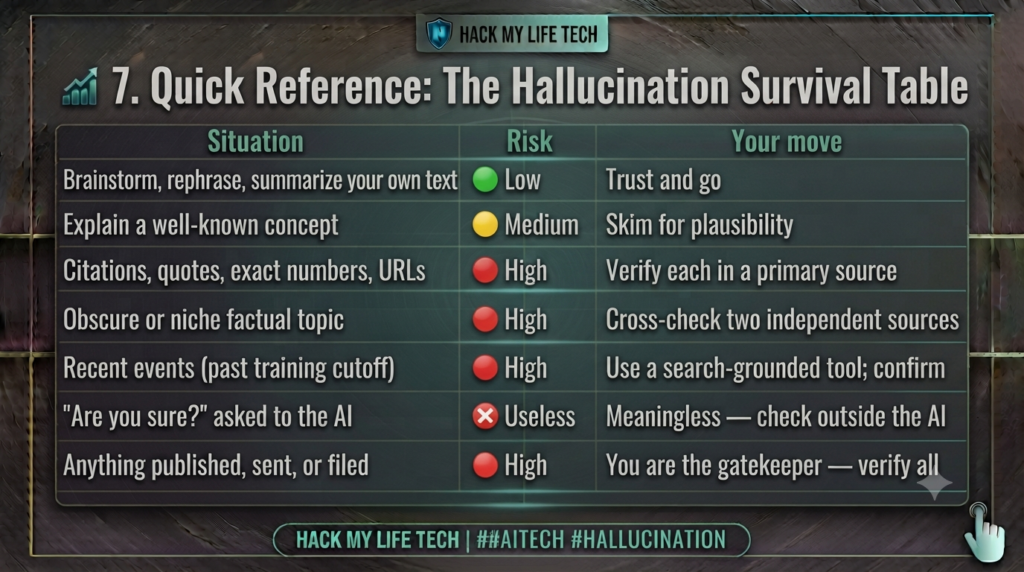
Note: “Trust and go” applies only to lower-risk creative or formatting tasks. It does not mean you should blindly trust AI. Always review privacy, accuracy, copyright, and important claims before using the result.
⚡ 8. Try It Today: Catch a Hallucination in the Wild
One useful way to understand the risk is to observe it safely with a public, non-sensitive prompt. Try this short experiment:
- Bait the trap: ask any chatbot for something obscure and citation-heavy — “List 3 peer-reviewed studies (with authors and years) about [a very niche hobby you know well].” Or ask about a tiny local detail from your hometown.
- Play detective: take each specific claim and search for it independently. Do those exact studies exist? Is that detail right?
- The exercise can reinforce why independent verification matters, whether the model answers correctly, refuses, or invents a source.
You just did in two minutes what two lawyers skipped — and it saved them nothing to skip it.
Five-point cheat sheet
- Fluent wording is not proof of accuracy.
- Verify names, numbers, dates, citations, prices, and current events independently.
- Use AI as a checklist for claims, not as the final source.
- Keep confidential and personal information out of consumer tools.
- Humans remain responsible for anything published, submitted, or sent.
📝 9. Series Finale: How Far You’ve Come
Look back at the whole journey:
- Step 1: AI isn’t magic or a robot — it’s software finding patterns to judge, predict, and create.
- Step 2: the nesting dolls — AI ⊃ machine learning ⊃ deep learning.
- Step 3: generative AI and LLMs — the next-word predictors.
- Step 4: under the hood — tokens, probability, and why fluent wording does not guarantee truth.
- Step 5: choosing your tool — representative tasks, measured correction effort and current account terms.
- Step 6: prompting — briefing, not wishing.
- Step 7 (today): verifying — the habit that protects all of the above.
Treat AI as a drafting and analysis tool whose output requires proportionate review. The tool can assist; responsibility for what is published, submitted, or acted upon remains with the human user.
The intern drafts at superhuman speed. You bring the judgment, the verification, and the accountability. That partnership — not the tool alone — is the actual superpower.
You started this series worried AI was too complicated to understand. You’re ending it able to explain tokens, choose between flagship models, write expert prompts, and spot a hallucination before it costs you.
You are no longer a bystander to this technology. You’re a capable, responsible driver.
That was the whole goal. Now go build something — carefully, and with your name proudly on it.
⏮️ Previous Lesson: [Step 6] Introduction to Prompts: How to Talk to AI Effectively
🎓 You’ve completed the AI Essentials series. Revisit any lesson anytime from The AI Essentials Curriculum Roadmap.