
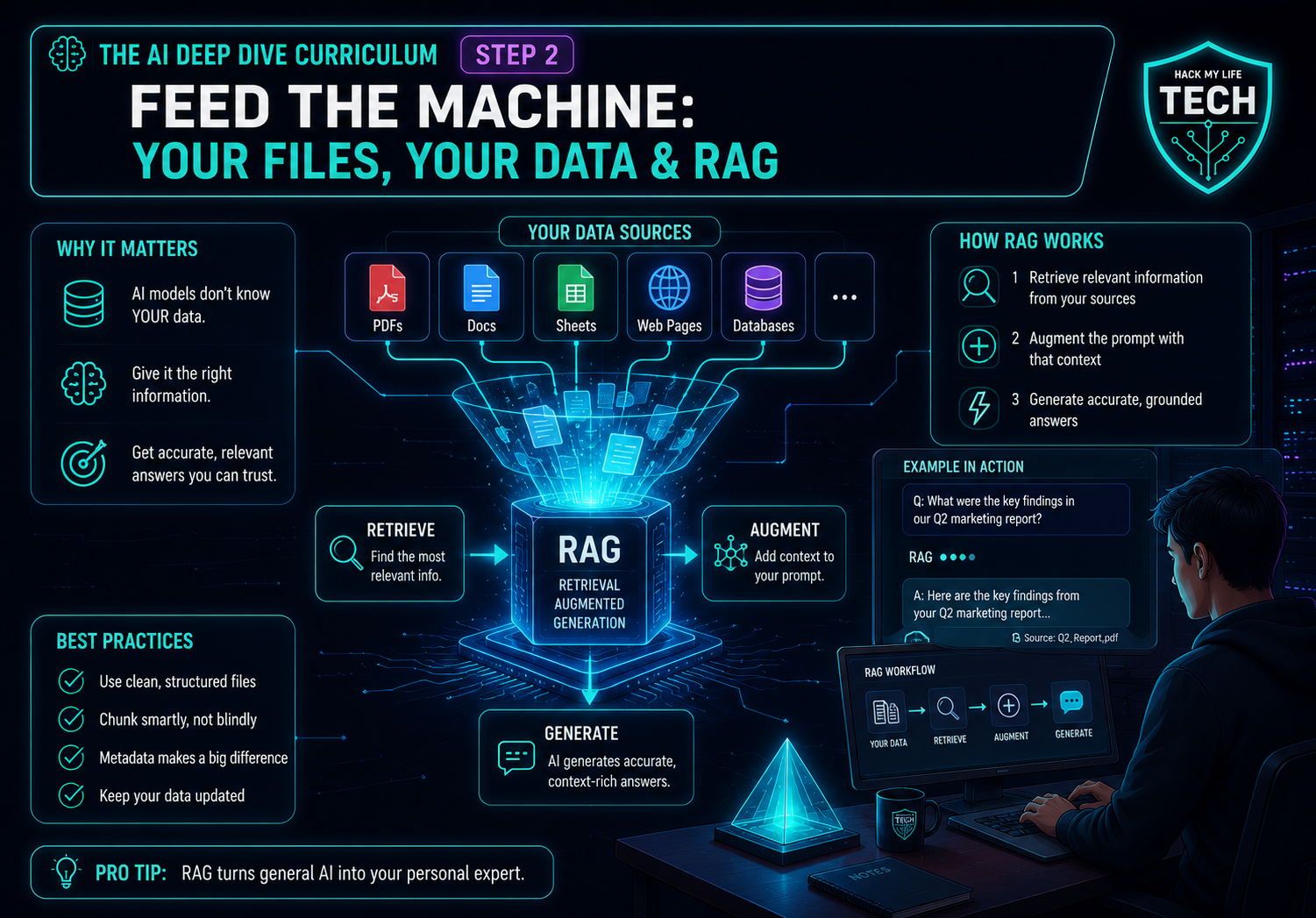
Welcome back to the AI Deep Dive curriculum. In Step 1 you learned to engineer the context you type — custom instructions, chains, and the realization that what you show the model matters more than the magic words.
Today we examine one practical way to improve answers on document-based tasks: giving an AI relevant documents through file uploads or retrieval-augmented generation (RAG).
Here’s the reframe that runs the whole lesson:
💡 A language model normally answers from patterns learned during training and from any context or tools available in the current session. A grounded workflow adds relevant passages from your own documents so the model has specific material to use. This can improve relevance and make answers easier to verify, but it does not guarantee correctness. That’s the whole trick, and it has a name: RAG.
By the end you’ll understand file uploads vs. persistent knowledge bases, demystify the acronym RAG (Retrieval-Augmented Generation) with an open-book-exam analogy a 10-year-old could follow, and see how grounding can reduce hallucination risk on document-based tasks, while still requiring verification.
1. The Closed-Book Problem (Why Even Great AI Guesses)
Recall from Essentials Step 4: a model answers by predicting the most plausible next token from patterns baked in during training. Without relevant source material or a retrieval tool, the model must rely on learned patterns and the context you provide. Training does not give it access to your private documents, and a training cutoff is not a guarantee that it knows every earlier fact.
Ask a closed-book AI about your company’s refund policy, your professor’s exact syllabus, or the clause in your lease, and it may ask for the document, acknowledge uncertainty, or produce a plausible-sounding answer based on similar material. A plausible answer is not evidence about your specific document.
Sometimes it’s a confident fabrication — the hallucination from Essentials Step 7, born precisely where specific facts meet thin training patterns.
The fix isn’t a bigger brain. It’s an open book.
2. RAG, Explained: The Open-Book Exam
RAG (Retrieval-Augmented Generation) sounds like engineer jargon, but the idea is beautifully simple. Break the acronym backwards:
- Generation — the AI writing an answer (what you already know it does).
- Augmented — made better/stronger by…
- Retrieval — first fetching the relevant pages from a document collection.
💡 The Open-Book Exam Analogy: A closed-book exam relies on what is already available to the model. An open-book workflow supplies selected passages before the answer. Retrieval can still select the wrong passage, and generation can still misread it.
RAG makes the task more like an open-book workflow by retrieving passages before generation. Retrieval is nothing more mystical than “find the right pages and put them on the desk before answering.”
In a retrieval-based document workflow, the system typically
(1) searches your documents for the passages most relevant to your question,
(2) pastes those passages into the context window alongside your question, and
(3) asks the model to answer using those passages. The model still uses learned patterns while processing the supplied text. Attaching a file does not by itself prove that retrieval happened: a product may insert text directly, retrieve selected passages, or use other file-processing tools.
- Source: Lewis, P., et al. (2020). Retrieval-Augmented Generation for Knowledge-Intensive NLP Tasks. Advances in Neural Information Processing Systems (NeurIPS).
- Why it matters: This is the paper that named and formalized RAG. It showed that pairing a language model with a retrieval step produces more specific, more factual answers on knowledge-heavy tasks than the model alone — It is an important research foundation for many retrieval-based document workflows, although individual products differ in implementation.
3. Why Grounding Can Reduce Hallucination Risk (The Step 7 Payoff)
This is the moment two lessons connect. In Essentials Step 7 you learned hallucinations spike on specific facts, exact quotes, and niche topics — exactly the closed-book danger zone. RAG attacks the problem at its root: it changes the question the model is answering.
- Closed-book question: “From everything you vaguely remember about the entire internet, what’s probably true here?” → high fabrication risk.
- Open-book question: “Using these three specific passages I just handed you, what does the document say?” → the answer can be grounded in supplied text and may include source-linked quotations, which still need checking against the original.
Grounding doesn’t make hallucination impossible — a model can still misread a passage, and a good RAG system will still sometimes retrieve the wrong page. So the Step 7 verification habit doesn’t retire; it gets easier.
When a tool exposes source passages or citations, you can check the claim against the relevant page in seconds instead of searching the open web. Grounding turns “trust me” into “see paragraph 4” — and that traceability is the real prize.
4. Your Three-Layer Knowledge Stack (No Code, Real Tools)
Many hosted tools provide document workflows without custom code. Choose according to the task and access requirements:
📎 Layer 1 — File Uploads (the one-off open book)
Drag a PDF, spreadsheet, or doc straight into the chat and ask about it. Useful for some single-session tasks: “Summarize this 40-page report,” “Locate clause 7 and summarise its wording without giving legal advice”, “Find every action item in these meeting notes.” For a one-off task, the file may be available only within that chat or project, but the provider’s retention, privacy, and data-use rules still apply. Before uploading a contract, client history, identification document, or other sensitive material, review the service’s current settings and policies, remove unnecessary personal information, and use an approved business workspace when required.
Privacy Before Uploading
For your first test, use a public or non-sensitive document. Do not upload passports, financial records, confidential client information, employer documents, or private contracts unless you have permission and have checked the provider’s privacy, retention, and data-use settings. AI file features are convenient, but “private to the chat” does not automatically mean that no data is stored or processed.
🗂️ Layer 2 — Persistent Knowledge Bases (the reference shelf)
When you want the AI to remember a body of knowledge across many conversations, you build a knowledge base: Claude Projects, ChatGPT’s custom-GPT knowledge, or Gemini’s notebook-style tools (like NotebookLM) let you attach a permanent set of files.
Depending on the service and its settings, chats in that space can use the attached material as a reference. File limits, retrieval behaviour, update timing, privacy settings and subscription features vary, so important answers still require verification.
🏢 Layer 3 — Connected & Team Knowledge (the live library)
The frontier: tools that connect directly to your live sources — Google Drive, Notion, a shared team wiki — so a team can query connected sources. Freshness depends on sync timing, indexing, permissions and what is actually retrieved; verify the document version behind a time-sensitive answer. This shades into the custom-assistant territory of Deep Dive Step 3, where you’ll package a knowledge base into a reusable teammate.
One rule that spans all three layers — garbage in, garbage out: RAG answers are only as good as the documents you feed it. A messy, outdated, or contradictory file collection produces confidently wrong open-book answers. Curate your shelf like you’d curate context in Step 1: relevant, current, clean.
🙋 5. Common Beginner Questions: Three Practical Scenarios
(Common questions about using files and RAG — answered without technical jargon.)
Q1 — Scenario: a resale side hustle: “This sounds technical and expensive. In plain terms — what would I actually do with ‘chat with my documents,’ and can I do it free?”
Answer: In plain terms, you give the AI your own documents and ask questions about them. You can often begin with a free plan, but file limits, available features, privacy settings, and RAG availability vary by service and subscription. Check the provider’s current official documentation before relying on a free workflow.
Concretely for your hustle: drop your supplier’s spreadsheet in and ask “which items have the highest margin?”; paste a platform’s seller-policy PDF and ask “am I allowed to list this?”; or keep a running “brand voice” doc of your best listings so every new one sounds like you.
Start by checking whether your chosen provider’s current plan supports file uploads, then upload a non-sensitive document and ask one question. When you repeatedly use the same file, compare the provider’s current project or knowledge-base limits before moving to Layer 2. No code may be needed, but features and costs vary by service.
Q2 — Scenario: a solo founder managing company documents: “I’ve got scattered docs everywhere — pricing, product specs, support answers. How do I turn that mess into an AI that actually knows my business?”
Answer: You build a Layer 2 knowledge base, and the curation is the real work — not the tech. Three steps.
First, gather and clean: collect your key docs, identify the authoritative version, and exclude superseded copies from active retrieval while retaining any archive required for records, because from Section 4’s garbage-in rule, one stale pricing sheet can lead to repeated pricing errors until the source is updated.
Second, load one persistent project (Claude Project, custom GPT, or a notebook tool) with that curated set.
Third, test it like Essentials Step 7 taught you: ask questions you already know the answers to and confirm it’s reading, not guessing — and check that it can point you to the source doc.
Now you’ve got a grounded business brain your whole day can query. The natural next move is wrapping it in standing instructions so it answers in your voice and rules automatically — which is precisely Deep Dive Step 3: Build Your Own AI Assistant. A curated knowledge base also provides useful input for Step 3.
Q3 — Scenario: an AI student learning the mechanics: “Under the hood — how does ‘retrieval’ actually find the right passage? Is it just keyword search, and where does it break?”
Answer: Great question, because knowing the mechanism tells you exactly when to distrust it. Many modern RAG systems use embeddings to capture semantic similarity, often combined with keyword or hybrid search: each chunk of your documents (and your question) is converted into a vector, a list of numbers capturing meaning, so the system retrieves passages that are semantically closest to your question even when they share no exact words.
That’s why it can find the right clause when you ask “can I get my money back?” and the document says “refund eligibility.”
Where it breaks is worth memorizing: retrieval can miss when your question and the source use very different framing, when the answer is spread across many chunks rather than sitting in one, or when the documents are poorly structured so chunking splits a fact in half.
And recall the lost-in-the-middle finding from Step 1 — even after the right passage is retrieved, burying it in a huge pile of other retrieved text can hurt.
So the failure modes are retrieval miss (wrong pages fetched) and generation drift (right pages, misread).
Both are exactly why grounding reduces but never fully removes the need to verify — you’re now checking a citation instead of the whole open web, which is a spectacular trade, but it’s not zero.
6. Cheat Sheet
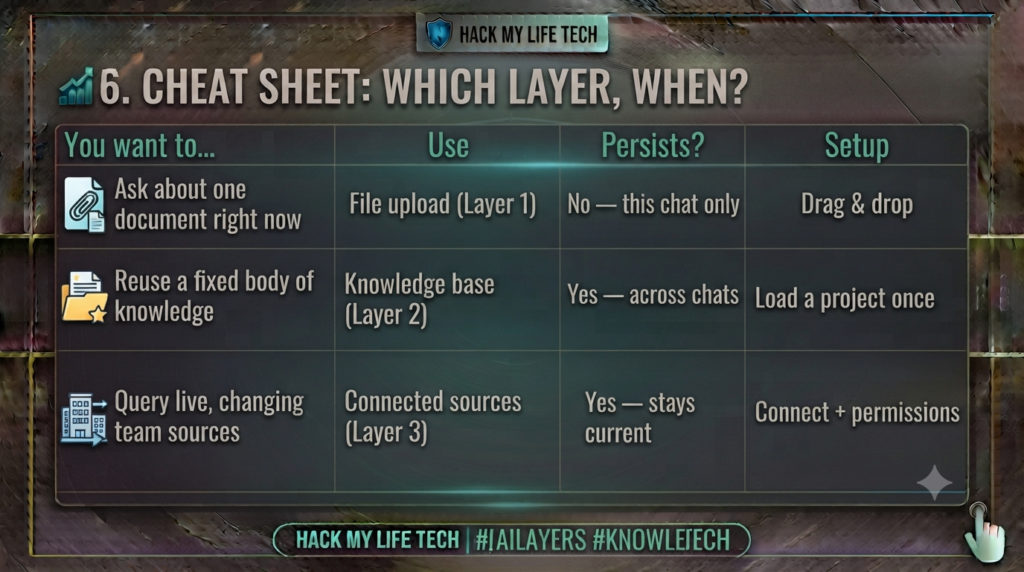
The grounding mindset: curate the shelf (relevant, current, clean) · let the AI cite its source · verify the citation, not the whole web.
⚡ 7. Try It Today: The 10-Minute Grounding Test
Feel the closed-book vs. open-book difference for yourself:
- Ask closed-book first. Without uploading anything, ask an AI a specific question only your document can truly answer from a public or synthetic practice document. For example, create a text file stating: “Example shop: returns accepted within 17 days; receipt required; clearance items excluded.” Ask for this example shop’s return window before supplying the file. Record whether the AI asks for a source, admits uncertainty or invents an answer.
- Now hand it the book. Upload the non-sensitive practice file and ask the identical question. For the synthetic example, the correct window is 17 days. Also ask whether clearance items qualify (no) and whether return shipping is free (not specified). These are expected answers from the supplied text, not results of a live model test. The answer may become more specific and easier to verify, but it can still be wrong or misread the document.
- Demand the receipt. Ask “which part of the document says that?” and confirm it can point to the passage. That traceability is a key benefit when the tool shows which passage it used, although different products provide different citation features.
A short comparison between grounded and ungrounded answers can reveal why source checking matters.
📝 8. Recap & What’s Next?
Today you gave your AI an open book:
- Without relevant sources, a model may answer from learned patterns, ask for more information or acknowledge uncertainty. Check claims about specific documents against those documents.
- RAG = open-book exam: retrieve the right passages, then generate from them (Lewis et al., 2020). Retrieval is just “put the right pages on the desk.”
- Grounding is the Step 7 payoff: it changes the question from “what do you vaguely recall?” to “what does this say?” — and lets you verify a citation instead of the whole web.
- Three layers: file uploads (one-off), knowledge bases (persistent), connected sources (live) — and garbage in, garbage out.
You’ve now got an AI that thinks in your voice (Step 1) and answers from your facts (Step 2). The obvious next step is to fuse them into a reusable specialist configured with instructions and reference files. Availability and scope depend on the product and workspace, and its sources still need maintenance. In the next lesson, we build your own AI teammate — no code required.
⏮️ Previous Lesson: [Deep Dive Step 1] Advanced Prompting & Context Engineering
⏭️ Next Lesson: [Deep Dive Step 3] Build Your Own AI Assistant: Custom GPTs, Claude Projects & Gemini Gems
Privacy and document-use note
Uploading a file transmits its contents to a service. Use public or approved non-sensitive files for practice, review retention and training settings, minimise personal data, and verify each citation against the original document.