
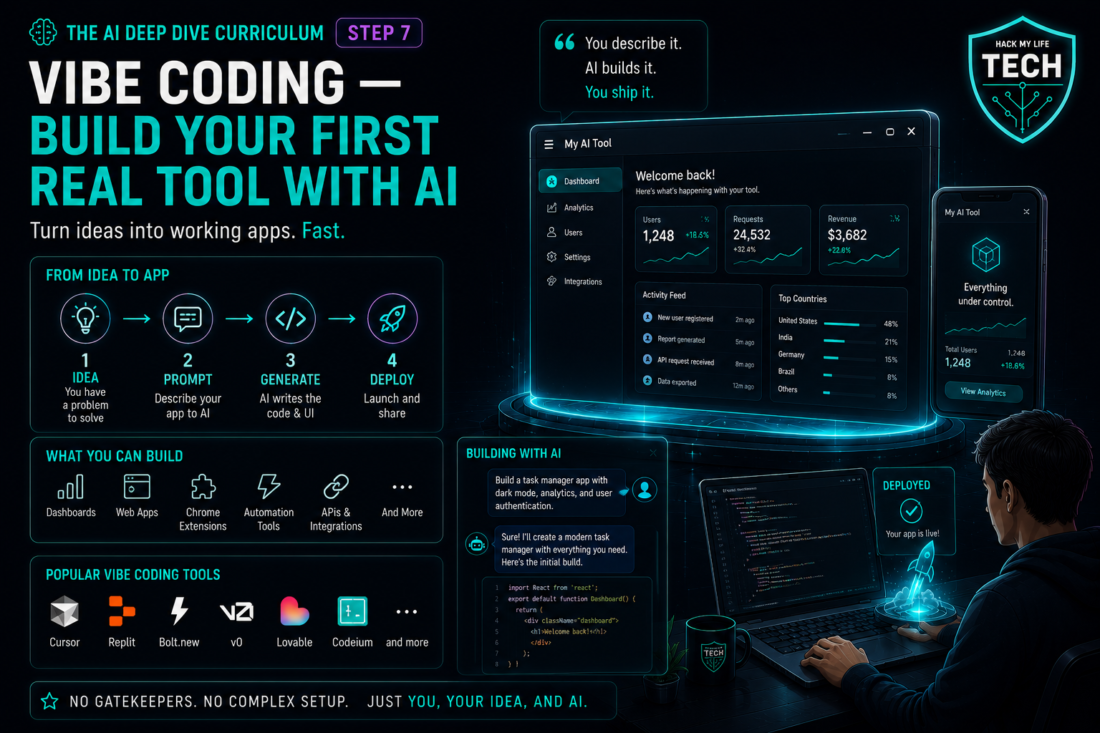
Welcome to the last skill lesson of the AI Deep Dive. Six lessons ago you were writing better prompts. Today you cross the final line between user and builder: you’ll describe software in plain English, watch vibe coding AI write it, and steer it until it works — with no computer science degree.
Here’s the reframe that runs the whole lesson:
💡 You don’t need to write code. You need to describe, test, and steer it. An AI coding tool can produce a first draft quickly, but it may miss requirements, security risks or maintenance problems. A generated explanation or security review can also miss defects. You supply the intent and the judgment. That partnership is the entire skill.
1. What “Vibe Coding” Actually Means
The term was coined by AI researcher Andrej Karpathy in February 2025 to describe a workflow where you state what you want in natural language, let the model generate the code, and iterate through follow-up prompts rather than reading every line yourself. It spread so fast that Collins English Dictionary named it Word of the Year for 2025.
Two things about the original idea matter enormously — and most tutorials skip both:
- Karpathy framed it for throwaway prototypes, not production systems handling other people’s money and data.
- The term later broadened to include AI-assisted prototyping and application development. Adoption figures vary by survey and definition, so this lesson focuses on a verifiable workflow rather than a headline percentage.
So this lesson gives you both halves: how to actually build something real, and where the line sits between “delightful personal tool” and “liability you shipped.”
2. Pick Your Surface
Three ways to build, from easiest to most powerful. Choose by project, not by hype.
- Chat + copy-paste. Ask any major AI for a single-file tool (an HTML page, a script), paste it into a file, open it. This can require little setup and may suit low-risk calculators, converters, and one-page utilities.
- Prompt-to-app builders. Describe an app; the platform generates, hosts, and gives you a link. Ideal for landing pages, simple trackers, and internal tools — with an important caveat covered in Section 5.
- AI coding agents / AI-native editors. The agent writes across multiple files, runs the code, reads the errors, and fixes them (this is the coding agent from Step 6, pointed at your project). The most capable path, and the one where the Step 6 guardrails apply directly.
⚠️ Snapshot note: Specific tools in this space change every few months. The workflow below is tool-agnostic on purpose.
3. How to Steer Code You Can’t Fully Read
This is the actual skill. Six habits separate people who ship from people who get stuck in an error loop:
- Spec before you build. Write what the tool does, who uses it, and what “done” looks like — then paste that as your brief. This is Step 1’s R-C-T-F-E, applied to software. Vague spec, broken app.
- One feature at a time. Get the simplest version working, then add. Asking for everything at once produces a tangle nobody — including the AI — can debug.
- Run it immediately, every time. Never accept three features’ worth of code you haven’t executed. A successful run is only one test signal; correctness, security, accessibility, and maintainability require separate checks.
- Feed errors back verbatim. Preserve the exact error wording and relevant traceback, but remove tokens, passwords, personal data and confidential paths before sharing it with “this error appeared, fix it.” Error text is the highest-value context you can give.
- Save working versions. Before any big change, keep a copy of the version that worked. Your undo button is a folder.
- Ask it to teach you. “Explain what this code does in plain English, and point out anything risky.” Explanations can support learning, but they can also be wrong; compare them with documentation and tests — the difference between vibe coding and vibe gambling.
4. Choose a Project With a Small Blast Radius
Start with a project where you control the data and can easily reverse the result. Personal calculators, simple trackers and local HTML tools are suitable starting points. Avoid handling other people’s data, payments, passwords or safety-critical decisions until the code has received appropriate technical and security review.
The rule of thumb: build freely only when the data and consequences are limited and reversible. If a project handles other people’s data or money, use established services and obtain qualified review before launch.
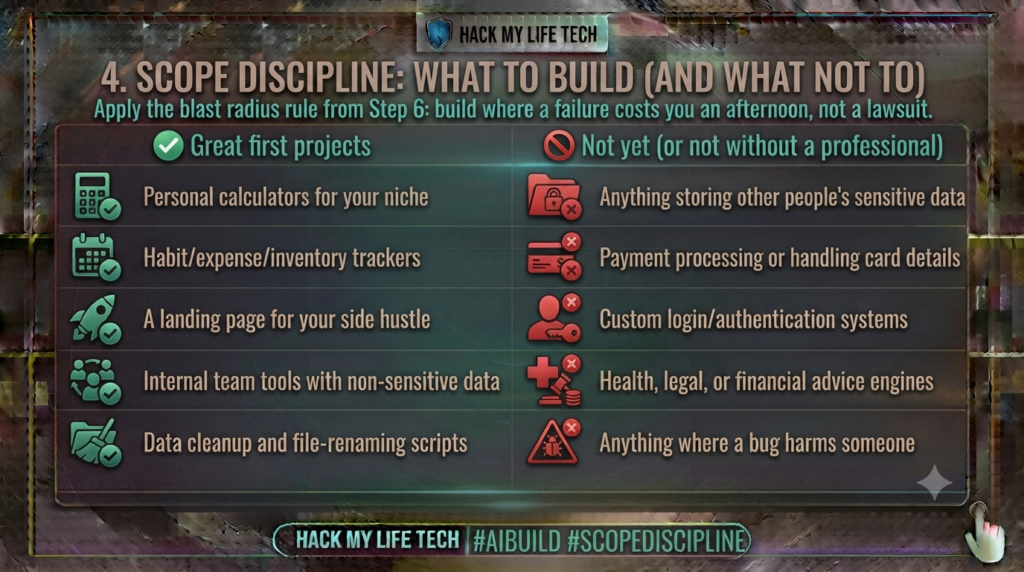
The rule of thumb: your data and your consequences? Build freely. Other people’s data or money? Use an established, professionally-built service instead.
5. The Security Reality Check (Read This Before You Ship)
This is the section that protects you, and it’s grounded in evidence, not vibes. Veracode’s 2025 benchmark tested more than 100 AI models across 80 coding tasks and reported that 45% of the generated samples failed its security tests. This is a controlled benchmark result, not a universal failure rate for every AI tool or application.
Separately, a USENIX Security 2025 study found invented package names in generated code. Average hallucinated-package percentages were at least 5.2% for commercial models and 21.7% for open-source models in the tested set. These are study-specific package metrics, not a universal percentage of insecure applications — a hallucination pattern attackers now exploit by registering those invented names with malicious payloads, a tactic nicknamed slopsquatting.
- Source: Spracklen et al., We Have a Package for You! (USENIX Security 2025). Verify dependencies before installation; an invented name can become a malicious registered package.
Why does this happen? Recall Essentials Step 4: models are optimized to produce code that looks right and runs, learned from vast codebases that include insecure examples. They don’t reason about adversaries the way an experienced engineer does. Code that works and code that’s safe are different things.
Your five non-negotiables:
- Never put secrets in code you publish. API keys, passwords, and tokens do not belong in anything a user can view.
- Don’t build your own login or payments. Use established providers. This is the single highest-risk area for beginners.
- Verify every package. If the AI imports a library, confirm the exact package name and publisher through its official documentation and registry, and check the requested version. Existence or popularity alone does not establish safety.
- Ask for a security review, then get a second opinion. “Review this code for security vulnerabilities and explain each one.” A second model may find additional issues, but models can share blind spots. Use relevant tests, dependency checks and qualified review when the consequences warrant it.
- Use synthetic or approved non-sensitive test data for prototypes. If real personal data is necessary later, obtain appropriate permission and apply security, retention, and legal controls.
None of this means don’t build. It means build the right things, and know that “it runs” is the beginning of the check, not the end.
🙋 6. Common Beginner Questions: Three Practical Vibe-Coding Scenarios
Q1 — Scenario: a stay-at-home parent with a resale hustle: “I’ve never written a line of code. Realistically, can I build something useful, and what should it be?”
Answer: Yes — and your first build should be small enough to test in one focused session and solve a real annoyance in your own week. A suitable low-risk starter is a pricing calculator for your niche: you enter sale price, item cost, shipping and platform fee, and it estimates profit under those explicit assumptions.
Ask for it as a single HTML file, save it, open it in your browser, and it can often run locally without hosting or a monthly fee, although external libraries, browser storage and future maintenance may still matter. It qualifies as a suitable first project when it uses only non-sensitive inputs. Check the formula manually with known examples because an incorrect result may not be obvious.
When it works, you’ll have crossed a line most people never cross: you’ll have made software. Then build the next one — a tracker for inventory or hours — and you’re compounding. Just keep customer information out of it entirely; also avoid credentials, payments, health or legal decisions, and any workflow whose failure could affect another person.
Q2 — Scenario: a solo founder: “How far can I take this? Can I actually launch a product built this way, or is it just for prototypes?”
Answer: Take it all the way through validation, then get deliberate. Vibe coding is genuinely transformative for the riskiest part of startup life — proving people want the thing — so build your landing page, your waitlist, your demo, and your internal tools this way and you may be able to test an idea quickly and cheaply, depending on the tool, project scope and hosting requirements.
That’s the phase the tool was born for. The line moves the moment real users trust you with real data or money: at that point Section 5’s evidence stops being trivia, because the vulnerability rates in AI-generated code aren’t acceptable in a system holding customer records or payments.
Practically, that doesn’t mean “hire a team on day one” — it means use established services for authentication, payments, and hosting rather than generating them yourself, and buy a professional security review before you handle anything sensitive.
Cheapest possible validation, deliberate investment at the trust boundary. And remember Essentials Step 7: when it’s your product, “the AI wrote it” protects nobody.
Q3 — Scenario: an AI-major student: “If AI writes the code, is learning to program pointless? And doesn’t relying on it erode my skills?”
Answer: Learning to program still helps you inspect and test what is generated. The security benchmark above does not measure learning or skill erosion. AI is genuinely good at producing code that runs; it’s unreliable at judging whether that code is secure, maintainable, or well-architected, the cited 45% result concerns the selected security tasks, not all of these qualities.
So the scarce skill is moving from writing code to reading, reviewing, and directing it: system design, threat modeling, debugging, and the ability to spot the vulnerability patterns AI produces repeatedly — a trainable skill security teams are now explicitly running workshops on.
On erosion: the risk is real if you accept output you never examine, which is why habit #6 in Section 3 exists — make the AI explain its code and you convert every build into a lesson instead of a dependency.
The developers who thrive won’t be the ones who type fastest; they’ll be the ones who can tell good code from code that merely runs. That judgment is what you’re in school to build, and it just became more valuable, not less.
📊 7. Cheat Sheet
| Phase | Do this | Watch for |
|---|---|---|
| Spec | Describe purpose, user, “done” | Vague briefs → broken apps |
| Build | One feature at a time, run it | Asking for everything at once |
| Debug | Share the exact error after removing secrets | Retyping errors from memory |
| Review | Review with tests and appropriate expertise | “It runs” ≠ “it’s safe” |
| Ship | Only within your blast radius | Others’ data, money, or logins |
⚡ 8. Try It Today: Ship Something in 45 Minutes
Use 45 minutes as a practice timebox, not a completion guarantee.
Known-answer check for the example calculator: Define profit = sale price − item cost − shipping − platform fee, and margin = profit ÷ sale price × 100. With sale price 50, cost 20, shipping 5 and fee 5, expected profit is 20 and margin is 40%. At a zero sale price, show margin as undefined rather than divide by zero. This simplified example excludes tax, returns and other overheads; these are arithmetic expectations, not a live test of a generated app.
- Pick a real annoyance (5 min) — a repeated calculation or a list you keep in your head.
- Write a 5-line spec (5 min) — what it does, who uses it, what “working” means.
- Ask for a single self-contained HTML file (10 min), save it as
tool.html, open it in your browser. - Iterate three times (15 min) — one change per round, running it each time.
- Ask it to explain the code and flag risks (10 min). You now have a first prototype and a basic review record, provided each step worked correctly on your setup.
📝 9. Recap & What’s Next?
- Vibe coding = describe, test, steer — coined by Karpathy in 2025, and originally meant for prototypes.
- Six steering habits turn frustration into shipping: spec, one feature, run it, paste errors, save versions, ask it to teach you.
- Scope by blast radius: your data and consequences, yes; other people’s data, money, and logins, no.
- The security evidence is real — Veracode’s 2025 benchmark tested more than 100 AI models across 80 coding tasks and reported that 45% of the generated samples failed its security tests. This is a controlled benchmark result, not a universal failure rate for every AI tool or application.
You’ve now built assistants, media, automations, and software. In the final lesson, everything converges: you’ll document your complete personal AI stack as a portfolio artifact, and we’ll have the honest conversation about turning these skills into income — four realistic lanes, ethical pricing and disclosure, and a 30-day plan. No get-rich-quick fantasies. Just the last mile.
⏮️ Previous Lesson: [Deep Dive Step 6] AI Agents & Automation
⏭️ Next Lesson: [Deep Dive Step 8] Capstone — Your Personal AI Stack & Turning Skills into Income
Prototype boundary
AI-generated code can run while still being insecure or incorrect. Keep early projects local and low-risk, use synthetic data, pin and verify dependencies, scan for secrets, test known cases, and obtain qualified review before handling other people’s data, authentication, payments, or safety-critical decisions.