
Welcome back to the AI Essentials series! In our last lesson, we opened the hood: tokens, probability dice, and the three-stage training pipeline that turns a prediction engine into an assistant. Which raises the obvious next question — if ChatGPT, Claude, and Gemini all run on the same science, why do they feel so different? And which one best fits your current tasks and constraints?
Here is the one sentence this entire lesson hangs on:
There is no permanently best assistant for every user or task. Capabilities, interfaces, limits, and model behaviour change. Compare the tools using your own approved tasks and current official information rather than relying on a fixed personality or leaderboard.
⚠️ Snapshot warning: Models, plans, prices, advertisements, limits, privacy terms, and integrations change frequently and vary by country, account, platform, and organisation. Treat every product detail below as a dated orientation, not a purchasing guarantee. Before subscribing or uploading sensitive material, check the current official product, pricing, privacy, and data-control pages.
1. Same Science, Three Personalities
Step 4 taught us that all modern chatbots are next-token prediction engines built on the Transformer. So why does the same question get a terse, precise answer from one tool and a bubbly, emoji-sprinkled one from another?
Because the science is shared, but three choices are not:
- The data recipe: Each lab feeds its models a different mix of text, code, and media during pretraining.
- The finishing school: Remember stages 2 and 3 of the pipeline — instruction tuning and human feedback? Each company’s human raters reward different behaviors. One lab’s reviewers prize thoroughness; another’s prize brevity. Those preferences fossilize into the model’s personality.
- The product wrapper: The model is the engine, but the app around it — search integration, file handling, voice, agents — decides what you can actually do.
This is why “which is best?” is the wrong question. The right one: which personality and wrapper fit the task in front of you?
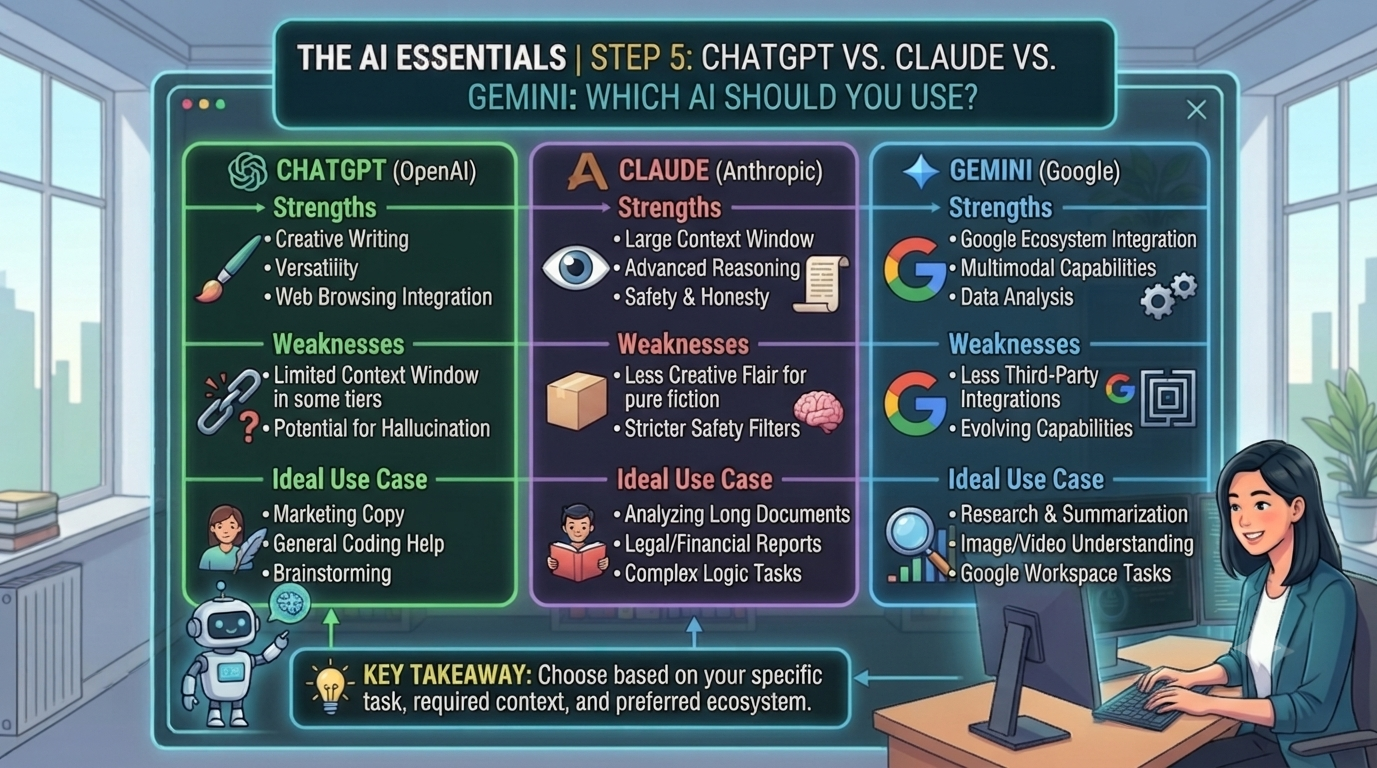
2. Meet the Big Three — A Dated, Task-Based Snapshot
🟢 ChatGPT (OpenAI) — The Versatile Pioneer
ChatGPT combines models with product tools. Available models and media features depend on the plan and mode; a feature in the app does not imply that every model supports it. Use the current official plan comparison to identify what your account includes.
- Known for: evaluate the tasks you need, such as file analysis, drafting or voice interaction, using the exact mode available to your account. Compare correctness and correction effort rather than assuming equal quality across tasks.
- Watch out for: response quality varies by model, mode, prompt, tools, and account. Advertising, limits, and plan inclusions can also change. Check OpenAI’s current pricing, product notices, and data-control documentation instead of assuming this snapshot still applies.
🟣 Claude (Anthropic) — The Craftsman for Words, Code, and Long Documents
For Claude, confirm the model, usage limits and required features on the official plan page. A product reputation is not evidence that a particular version will outperform another tool on your documents or code.
- Known for: many users may prefer Claude’s writing style for certain editing tasks, but perceived naturalness is subjective and can vary by prompt and model version. It is also designed for faithful instruction and style following, long-document analysis, and coding assistance; availability and limits vary by plan and region.
- Watch out for: image features, integrations, and usage limits vary by model, plan, account, and region. Check the current official product and pricing pages before choosing a plan.
🔵 Gemini (Google) — The Ecosystem Native
For Gemini, compare the current Google AI plans and the settings available to your account. Test any Workspace connection with approved sample material before relying on it.
- Known for: native integration with Gmail, Docs, and Drive; real-time answers grounded in Google Search; selected multimodal features; large context windows; and a free plan whose features and usage limits may change by plan, account, and region.
- Watch out for: integration access and response quality need checking on your actual account and task. This article has no controlled benchmark establishing a writing or coding ranking among the three.
3. A Task-by-Task Comparison Framework
Use the same task and acceptance criteria for each tool. The table is an evaluation worksheet, not a claim that one brand wins.
| Task | Check on every tool | Record |
|---|---|---|
| Summarize a supplied document | Are names, numbers and conclusions supported by the source? | Errors, omissions, correction minutes |
| Draft a message | Does it preserve facts and meet tone and length constraints? | Instruction failures, edits required |
| Explain or repair code | Does the proposed change pass the relevant test? | Test result, regressions, review time |
| Research a question | Do cited pages exist and support the answer? | Source quality, unsupported claims |
Record the date, model or mode, plan, prompt and tool settings with each result. One example is useful for a personal trial but is not a general benchmark.
4. Subscription Decisions Without Stale Price Assumptions
Record the actual checkout currency, tax, billing period, usage limits and renewal terms for each candidate. The official pages below were checked on 11 September 2026; the price shown to your account can differ.
Three practical takeaways:
- In the United States, Several standard individual plans may appear similar in price, but features, usage limits, taxes, billing currency, and local pricing vary. Australian readers should check the current AUD price before subscribing. (Check the latest official pricing before making a decision: ChatGPT plans, Claude plans, and Google AI plans.)
- Billing periods, cancellation rules, taxes, currencies, refunds, and plan availability vary by provider, region, platform, and subscription. Read the checkout terms before paying and confirm how to export your data and cancel.
- Do not assume that one paid plan plus two free plans is optimal. Start with approved free access where appropriate, compare the same non-sensitive tasks, and pay only when a measured benefit justifies the current price and terms.
🙋 5. Reader Q&A: Three People, Three Very Different Questions
(Representative questions beginners commonly ask — answered without the jargon.)
Q1 — from an office worker whose company will expense exactly one subscription: “One pick, no do-overs until next budget cycle. How do I choose without regretting it?”
Answer: Run a three-step audit before you spend a cent.
Step 1 — time audit: list your three most frequent AI-shaped tasks and the hours they eat weekly (e.g., “report drafting 4h, meeting summaries 2h, spreadsheet analysis 2h”).
Step 2 — run the same representative, non-sensitive tasks in the tools available to you. Score accuracy, source quality, instruction-following, privacy controls, accessibility, limits, and total cost. Product reputations are hypotheses to test, not conclusions.
Step 3 — review the current checkout and cancellation terms before committing. Plans, billing periods, regional prices, taxes, and refund rules differ; switching may also require rebuilding instructions, workflows, or integrations.
Q2 — from a solo startup founder counting every dollar: “Can I just stack the free tiers and pay for nothing? What’s the scrappy setup?”
Answer: Combining free tiers can be useful for low-risk experimentation when provider terms and organisational policy permit it. Free access is limited, can change or disappear, and does not make a service appropriate for confidential, personal, regulated, or high-stakes work.
Gemini’s available free access may include search, file, or Workspace-related features depending on account, region, and current product configuration. Verify sources and confirm data controls before connecting documents.
Claude’s free access, models, tools, and message limits vary. Reserve limited usage for tasks where your own comparison shows a benefit, and do not infer safety or accuracy from the plan name.
ChatGPT’s free access, advertisements, models, and feature limits can change by region and account. Check the current official plan and privacy pages rather than relying on a fixed price or feature list.
A safer upgrade rule is to measure the tool on authorised representative tasks, compare the time and correction effort saved against the current regional price, and subscribe only when the expected benefit exceeds the cost. Recheck privacy, cancellation, quota, and billing terms first.
Q3 — from a first-year teacher planning an AI unit: “Which one do I bring into my classroom?”
Answer: For a classroom, three considerations outrank any benchmark.
First, accounts and age policies matter. The consumer versions of these tools have different minimum-age and account rules. Before using AI in class, check the education offerings and your school’s IT policy. ChatGPT Edu, Claude for Education, and Google Workspace with Gemini provide education-focused options with different controls and privacy terms.
Second, match the tool to the lesson goal, not the brand: a current-events research lesson wants search grounding; a writing-feedback lesson wants precise, style-faithful editing.
Third — and this is the teaching gold — make comparison itself the lesson. Give students one identical prompt, run it on two tools side by side (projector, live), and have the class grade the outputs:
Which is accurate? Which cited sources? Which just sounded confident? You’ll be teaching tool-agnostic evaluation skills — the exact habit Step 7 (hallucinations) depends on — and those transfer no matter which logo wins next year.
⚡ 6. Try It Today: The 15-Minute Personal Bake-Off
Privacy first: Use anonymised sample text. Do not paste passwords, personal information, client data, student records, confidential business documents, or private emails into consumer AI tools. Check each provider’s current privacy and data-retention settings before testing real work.
Published comparisons can provide a useful starting point, but the most reliable result comes from testing each tool on your own non-sensitive tasks. Here’s how to generate the only verdict that matters:
- Choose a representative task and reproduce it with synthetic, public or explicitly approved material. Keep the same requirements without disclosing private work.
- Run the identical prompt through the plans or trial access currently available to you, copy-paste, with no prompt tweaking.
- Record accuracy and fit on a 1–5 scale, higher being better. Separately record correction time in minutes, lower being better. Note any critical error; do not mix minutes into the rating total.
- Reject candidates that fail essential accuracy or privacy requirements. Among the remaining results, compare fit, correction time and current cost. Re-run when the model, task or plan materially changes.
Fifteen minutes, and you’ve replaced every “best AI 2026” listicle on the internet with a benchmark of one: you.
📌 7. Staying Current: The Three Bookmarks
Because this lesson has an expiry date and the framework doesn’t, bookmark the primary sources and check them before any purchase:
- Source: OpenAI — chatgpt.com & openai.com (product news, pricing, and the ads policy). Accessed July 2026.
- Source: Anthropic — claude.ai & anthropic.com/news (plans, models, and feature updates). Accessed July 2026.
- Source: Google — gemini.google.com & blog.google (Gemini models and Workspace integration news). Accessed July 2026.
Community leaderboards (such as LMArena’s crowd-voted rankings) are fun weather reports on which model is “hot” — but treat them as vibes, not verdicts. Your Section 6 bake-off outranks them all.
📝 8. Recap & What’s Next?
Today you replaced a brand war with a decision framework:
- Same science, different personalities: data recipes, human-feedback choices, and product wrappers — not magic — make the three feel different.
- Decision shorthand: compare current capabilities through your own task set, verify official plan details, and choose the tool whose measured benefits, data controls, accessibility, and total cost fit your situation.
- Money strategy: start with evidence from your own approved tasks, check current regional pricing and cancellation terms, and subscribe only when the expected time or quality benefit exceeds the cost.
- Your bake-off beats every listicle — including this one. Time-stamp everything; verify at the official sites.
But here’s the twist that makes the next lesson the highest-leverage one in this series: clearer instructions can change the result substantially. This article does not establish that prompt quality always matters more than model choice.
You’ve chosen your car — now it’s time to learn to drive. In Step 6, we break down the exact formula for talking to AI so it actually does what you mean.
⏮️ Previous Lesson: [Step 4] How Do AI Models Work? The Science Behind the Answers
⏭️ Next Lesson: [Step 6] Introduction to Prompts: How to Talk to AI Effectively